
Introduction to Cloud Native and Artificial Intelligence (CNAI) Part-2

✍️Co-authors
1. Aman Mundra
2. Shivani Tiwari
Part 2: Inside a Cloud Native AI Pipeline: How It Really Works and the Hard Problems You will Face
1. Introduction
In Part 1, we discovered how cloud native technology and artificial intelligence (AI) fit together to bring flexibility, scalability, and reliability to modern workflows. But once you set out to build or run AI in a cloud native environment whether for product recommendations, fraud detection, or research the process quickly gets complicated.
This article guides you through a real CNAI pipeline: what happens step by step, what you should expect, and where things get challenging.
2. What’s in a Typical CNAI Pipeline?
A CNAI pipeline is the structured flow that takes raw data and transforms it into usable, intelligent AI predictions, managed using cloud native principles.
The main steps are:
-
Data preparation- gathering and cleaning the information AI will learn from
-
Model training- teaching the AI to make decisions or predictions
-
Model serving- putting the trained model into action, answering real user queries
-
Observability and monitoring- tracking performance, detecting problems, iterating
Let’s break these down with everyday analogies and real-life examples.
a. Data Preparation- Getting Your Ingredients Ready
Think of building AI like cooking: before you start, you need ingredients, good, fresh, and properly portioned. For AI, that’s data: images, transactions, logs, text documents, or time-series numbers. But in practice, these data sets are huge and messy, sometimes spread across many locations.
Challenges You will Face
-
Size: Data grows fast. Training today’s models might use terabytes, even petabytes, of information.
-
Different Sources, Different Formats: Data may live in cloud storage (S3, GCS), databases, object stores, and spreadsheets.
-
Synchronization: Developers often build models on small, local samples, but scaling to production means handling distributed data, sometimes in very different environments.
-
Data Governance: Privacy rules (like GDPR, CCPA) and company policies mean you must track who owns data, where it comes from, and who can use it.
Example
Imagine an Indian online grocer building a recommendation engine. It collects shopping basket histories, web clicks, and real-time shelf data from stores. To prepare this for AI:
-
Use distributed storage and tools like Spark or Ray for cleaning and joining
-
Track privacy: ensure sensitive user data is encrypted and access is logged
-
Format data so it works whether training happens locally or on a big Kubernetes cluster
Solutions Making Things Easier
-
Tools like Kubeflow and Ray help unify code for local and distributed execution.
-
Using containers lets you package up code and dependencies, so what works locally, works “in the cloud.”
-
Data lineage tracking tools map how data travels, ensuring you can explain every decision your AI makes which is crucial for audits and avoiding bias.
b. Model Training- Teaching the AI
This is the high-energy phase, feeding your data to machine learning algorithms (like neural networks or tree ensembles) and letting them learn patterns.
Challenges You will Face
-
Resource Needs: Training can gobble up GPU/TPU accelerators and loads of RAM. These chips are expensive.
-
Iteration: Training is rarely “one and done.” You tweak hyperparameters, retrain, and sometimes train dozens of models in parallel.
-
Orchestration Complexity: Coordinating all these jobs — making sure resources are well used, that data gets shared safely, and jobs don’t conflict, is tough.
-
Cost and Sustainability: Accelerator time costs big money. Training huge models means thinking about costs and increasingly, the environmental impact.
Example
A fintech startup wants to train a fraud detection model using millions of historical transactions. They need to:
-
Spread training across multiple GPUs, possibly from different vendors (Nvidia, Google, Intel)
-
Use Kubernetes with scheduling tools (like Volcano or Yunikorn) to share accelerators between teams
-
Make sure GPU drivers and software versions are correct otherwise, training can crash or produce unpredictable results
-
Track energy use and emissions (using mlco2 or codecarbon), especially if their clients care about sustainability
Solutions Making Things Easier
-
Resource Fractionalization: Technologies like MIG and DRA enable dividing GPU resources among groups.
-
Unified Platforms: Tools like Ray, KubeRay, and Kubeflow simplify multi-team, multi-framework orchestration.
-
Autoscaling: Cloud native infrastructure automates spinning up and tearing down resources based on need, dialing cost up or down dynamically.
-
Location-Aware Scheduling: Training jobs can be sent to regions using renewable energy, shrinking carbon footprint.
c. Model Serving- Putting AI to Work
Once your model learns, you want it to answer real questions. Model serving is about deploying the trained model so applications (websites, mobile apps, internal tools) can call it for predictions, ideally in real time.
Challenges You will Face
-
Load Variability: Traffic might spike during sales or festival seasons. Servers must handle sudden demand without crashing.
-
Latency and Performance: A recommendation engine must reply instantly; a medical image analyzer might be fine to take a few seconds.
-
Memory and Scaling: Big models are now often “memory bound”, especially LLMs. Serving needs smart allocation so models don’t get bogged down.
-
Resilience: Servers must recover gracefully from crashes and stay available for retries.
Example
During Diwali, an e-commerce platform needs its recommendations to work for millions of users at once. They use:
-
KServe on Kubernetes to autoscale model server replicas as traffic increases
-
GPU sharing so expensive hardware is never idle
-
Regional replication for disaster recovery (if one region fails, others keep running)
-
Model versioning so new models can be rolled out safely — with instant rollback if bugs appear
Solutions Making Things Easier
-
Immutable Deployment: Models can be published as container images, with version tags for traceability.
-
Event-Driven Autoscaling: Projects like KEDA ramp resource use up and down based on real signals (queue depth, API calls)
-
Opportunistic Scheduling: Use idle CPUs/GPUs to support lower-priority requests, saving cost.
-
Observability Tools: Prometheus, OpenTelemetry, and OpenLLMetry let you track health, latency, and errors.
d. Observability and Monitoring- Keeping AI on Track
Once your models are live, it’s crucial to watch how they’re doing.
Challenges You will Face
-
Detecting Drift: Models can lose accuracy over time as patterns change (e.g., new fraud tactics, changes in customer behavior).
-
Catch Infrastructure Issues: Long training jobs may run into hardware, network, or cloud errors that aren’t obvious.
-
Debugging Distributed Failures: Problems spread across clusters, GPUs, and cloud regions are hard to isolate.
-
Security: Models must withstand attacks, especially in public-facing applications.
Example
A food delivery company finds that after launching a new cuisine category, its recommender’s accuracy drops. Monitoring tools catch this “drift” and notify data scientists to retrain.
Solutions Making Things Easier
- Model Monitoring: Track inputs, outputs, and confidence scores over time.
- Automated Alerts: Send notifications when performance metrics go out of bounds.
- Distributed Logging and Tracing: Centralize logs using OpenTelemetry so issues can be traced across microservices.
- Vulnerability Scanning: Containers are scanned (using Grype, Trivy) for security flaws before deployment.
3. The Developer/AI Practitioner Experience- Bridging the Gap
Despite all these tools, building and deploying CNAI can still feel tricky, often involving skills outside a typical data scientist’s comfort zone (like writing resource YAMLs, managing cluster quotas, troubleshooting GPU drivers).
a. Big Friction: Setting up environments often takes longer than model coding.
b. Fragmented Tools: Each pipeline step might use different GUIs, APIs, or SDKs.
c. Reproducibility & Upgrades: Ensuring your model runs the same way everywhere (and survives cloud upgrades) can be frustrating.
Evolving Solutions
- End-to-End APIs and Python SDKs: Many tools offer developer-friendly libraries so you can deploy directly from familiar notebooks (Jupyter, VSCode) without wrestling with cluster configs.
- Unified ML Platforms: Kubeflow, Ray, and similar integrate steps — preparation, training, deployment, behind a single interface.
- Workflow Automation: Orchestrators like Elyra and Kubeflow Pipelines let you build and trigger workflows visually, reducing manual steps and errors.
4. Cost, Sustainability and Cross-Cutting Concerns
CNAI isn’t just about performance, it’s also about cost and environmental impact.
-
Right-sizing: Autoscaling and fractional GPUs avoid wasted spend.
-
Disaster recovery: Replicate models across zones.
-
Energy and carbon: AI teams increasingly monitor and report their model’s environmental footprint, making deployment decisions greener.
5. Real-World Example- Unified ML Infrastructure at Scale
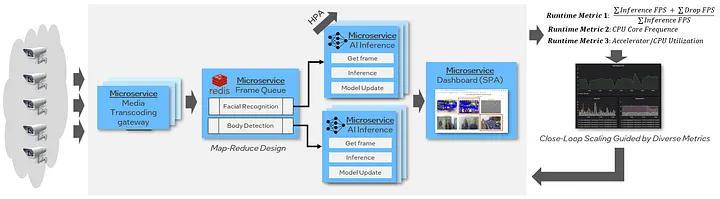
A global logistics firm was running dozens of separate microservices for each AI task (data prep, training, inference), causing high cost and slow iteration. By moving to a unified microservice platform built on Ray and Kubernetes, they:
-
Simplified resource sharing
-
Halved yearly inferencing costs
-
Slashed deployment times
-
Gained better observability and resilience during traffic surges
6. Final Takeaways: Navigating the Pitfalls, Seizing the Opportunities
Building CNAI systems is hard. You’ll wrestle with data movement, resource allocation, scaling, and developer experience. But the cloud native ecosystem and CNCF projects are rapidly closing the gaps, making it easier to build, deploy, and operate AI at scale for every business size.
Key lessons:
-
Focus on reproducibility and portability; use containers for everything.
-
Automate wherever possible- autoscaling, deployment, monitoring.
-
Invest early in monitoring and security; catching issues quickly saves big pain.
-
Embrace unified platforms and APIs to make development smoother for everyone, not just experts.

Welzin is a consultancy dedicated to the strategic implementation of Artificial Intelligence.
+91 7899080498
Explore
Think AI, Think Big.
About Us
Welzin is a consultancy dedicated to the strategic implementation of Artificial Intelligence.
© 2026 Welzin Inc.
All Rights Reserved