
Building a RAG Pipeline

✍️ Co-Authors:
1. Vikram Kumawat
2. Aman Mundra
Introduction
This article explains how to build a “RAG (Retrieval-Augmented Generation)” pipeline, combining document retrieval with LLM text generation for accurate AI responses. It covers key steps- chunking, embedding, vector databases (Chroma, Pinecone, Waviate, Neo4j and Qdrant), and integration with tools like “Ollama & LangChain” Includes practical code examples for implementation.
What is a RAG?
A RAG (Retrieval-Augmented Generation) pipeline is an AI system that combines information retrieval with text generation to generate more accurate, context-aware responses. Instead of relying solely on a pre-trained LLM (which has a fixed knowledge base), a RAG pipeline retrieves relevant documents from an external knowledge source before generating a response.
This approach significantly reduces hallucination, improves factual accuracy, and allows the LLM to work with up-to-date or domain-specific information.

Flow diagram of RAG
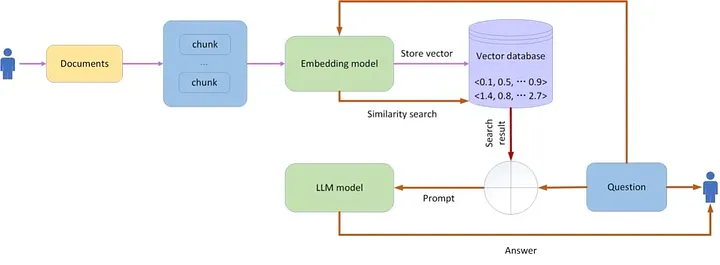
Types of RAG
-
Naive RAG
The Naive RAG technique follows a process that includes indexing, retrieving, augmenting and generation of response.
Advanced RAG
The Advance RAG technique follows a process that includes:
-
Pre-retrieval (indexing Query manipulation, Data modification)
-
Retrieval(Searching and Ranking)
-
Post-retrieval(Re-ranking, Filtering)
-
Generation(Enhancing, Customization)

Hallucination:
Hallucination is a phenomenon where a Large Language Model (LLM) generates responses that are inaccurate, nonsensical, or factually incorrect. These outputs may appear convincing but are not grounded in real data or logic.
Ollama module
-
Ollama is a free tool that lets you run Large Language Models (LLMs) on your own computer.
-
By running AI models locally, Ollama reduces latency, enhances performance, and allows for complete customization.
Use the DeepSeek LLM model, which is run on Ollama server.
Steps to install Ollama tool and run DeepSeek Model
1. Code to install Ollama on Google Colab.
2. Run Ollama server
!nohup ollama serve &
3. Pull DeepSeek model
Here I use the DeepSeek-r1: 1.5b model because it takes less time on the CPU, you can use as per your choice.
!ollama pull deepseek-r1:7b
!ollama pull deepseek-r1:1.5b
1. Next, Import necessary Modules and Packages.
# Import necessary packages import ollama # Enables interaction with local large language models (LLMs) import gradio as gr # Provides an easy-to-use web interface for the chatbot # Document processing and retrieval from langchain_community.document_loaders import PyMuPDFLoader, TextLoader # Extracts text from PDF files for processing from langchain.text_splitter import RecursiveCharacterTextSplitter # Splits text into smaller chunks for better embedding and retrieval from langchain.vectorstores import Chroma # Handles storage and retrieval of vector embeddings using ChromaDB # Embedding generation from langchain_community.embeddings import OllamaEmbeddings # Converts text into numerical vectors using Ollama’s embedding model import re # Provides tools for working with regular expressions, useful for text cleaning and pattern matching
# Import modules from typing import List from langchain.embeddings import HuggingFaceEmbeddings from langchain.chains import RetrievalQA from langchain.llms import HuggingFacePipeline from langchain_community.llms import Ollama from langchain.chains.llm import LLMChain from langchain.chains.combine_documents.stuff import StuffDocumentsChain from langchain.prompts import PromptTemplate from transformers import pipeline from google.colab import drive
We mount Google Drive in Google Colab to store and access data.
Document Transformers
Document Transformer is a component that processes retrieved documents before passing them to the language model. It ensures that the retrieved context is structured, relevant, and optimized for generating high-quality responses.

Parsing Files
Below is the code to load documents from Google Drive:
def read_files(): print(“read all the files in directory”)drive.mount(‘/content/drive’)# Path to your PDF in Colab (adjust as needed)# pdf_path = ‘/content/credit_card.pdf’ # Example: PDF in your Drive pdf_path = ‘/your/pdf/path.pdf’ # PyMuPDFLoader initializes the PDF file loader = PyMuPDFLoader(pdf_path) # .load() method reads the content of the PDF and extracts its text documents = loader.load() return documentsread_files()for doc in read_files(): print(‘Print metadata like page number :’, doc.metadata) print(‘Print page content : ‘, doc.page_content)
Once the data is loaded, you can transform them to suit your application, or to fetch only the relevant parts of the document. Basically, it is about splitting a long document into smaller chunks which can fit your model and give results accurately and clearly.
Splitting
-
Text Splitter is a component that divides large documents into smaller, manageable chunks before they are stored in a vector database for retrieval.
-
There are several “Text Splitters” in LangChain, you have to choose according to your choice. I chose “RecursiveCharacterTextSplitter”. This text splitter is recommended for generic text. It is parametrized by a list of characters. It tries to split the long texts recursively until the chunks are smaller enough.
Why Do We Need to Split Text?
-
LLMs have token limits (e.g., Mistral-7B has a context length limit).
-
Large documents can contain irrelevant information; splitting helps retrieve only the most relevant parts.
-
Improves retrieval accuracy by enabling finer-grained searches instead of retrieving entire documents.
Chunking
Breaking down your large data files into more manageable segments

Why Chunking is Important
To provide the LLM with precisely the information needed for the specific task.
Based on the complexity and effectiveness chunking divides into five types:
-
Fixed Size Chunking : It breaks down the text into chunks of a specified number of characters, regardless of their content or structure.
-
Recursive Chunking: We divide the text into smaller chunk in a hierarchical and iterative manner using a set of separators.
-
Document Based Chunking: In this chunking method, we split a document based on its inherent structure.
-
Semantic Chunking: All above three levels deal with content and structure of documents and necessitate maintaining constant value of chunk size. This chunking method aims to extract semantic meaning from embeddings and then assess the semantic relationship between these chunks.
-
Agentic Chunking: Agentic Chunking is an advanced method of text chunking in Retrieval-Augmented Generation (RAG) pipelines where the chunking strategy dynamically adapts to the content rather than following a fixed rule (like simple token or sentence-based chunking). The term “agentic” refers to the use of an agent-based approach where an AI model, heuristic, or predefined logic intelligently decides how to segment the text for optimal retrieval and generation.
Key Parameters to Know
-
buffer_size: configurable parameter that decides the initial window for chunks.
-
breakpoint_percentile_threshold: another configurable parameter. The threshold value to decide where to split the chunk
-
embed_mode: the embedding model used.
def chunk_data(): print(“chunking pdf data”) # RecursiveCharacterTextSplitter splits the PDF into chunks of 500 characters, # keeping 100 characters overlap to keep context text_splitter = RecursiveCharacterTextSplitter(chunk_size=500, chunk_overlap=100) # Splits the documents into chunks and stores them in chunks object chunks = text_splitter.split_documents(read_files()) return chunkschunk_data()
Use chunk_size = 500
Use chunk_overlap = 100
Embedding
Embedding transforms each chunk into a dense vector, a numerical representation that captures the semantic meaning of the text. These vectors, typically generated by pre-trained language models, are then stored in a vector database.

Code for embedding:
# Embeddingembeddings = OllamaEmbeddings(model=”deepseek-r1:1.5b”)print(“Embedding Vector:”, embeddings)
We use OllamaEmbedding and DeepSeek-r1: 1.5b model
Different types of embeddings
-
Word Embedding:
A word embedding is essentially a vector that represents a specific word in a given language. The dimeni this vector can range anywhere from a few hundred to a few thousand dimensions.
Word embedding lies in their ability to capture semantic relationships between words.
-
Graph Embedding:
Graph embeddings are another type of embedding that are used to represent graph data. Graphs are data structures that consist of nodes and edges, and they are commonly used to represent relationships between entities.
A graph embedding is a low-dimensional vector that represents a node in a graph. The goal of a graph embedding is to preserve the structural information of the graph in the low-dimensional space. This means that nodes that are close to each other in the graph should also be close to each other in the embedding space.
-
Image Embedding:
Image embeddings are used to represent image data. The idea is similar to word embeddings: a high-dimensional image is represented as a low-dimensional vector. These embeddings can capture visual similarities between images, which can be useful for tasks like image recognition and image clustering.
Vector Databases
Vector databases store data as high-dimensional vector embeddings, capturing semantic meaning and relationships. They utilize specialized indexing techniques like hashing, quantization, and graph-based methods to enable fast querying and similarity searches.
Code for Vector Store
vectorstore = Chroma.from_documents( documents=chunks, embedding=embeddings, persist_directory=”./chroma_db”)print(“Total Documents in Vector Store:”, vectorstore._collection.count())retrieved_docs = vectorstore.similarity_search(“what is the joining date”, k=4)print(“Retrieved Document:”, retrieved_docs[1].page_content)retriever = vectorstore.as_retriever()
Type of Vector and Graph Databases:
-
Chroma:
Chroma is an open-source embedding database that simplifies the development of large language model (LLM) applications. It supports LangChain (Python and JavaScript) and LlamaIndex, making it easy to manage text documents, convert text to embeddings, and perform similarity searches.
-
Pinecone:
Pinecone is a managed vector database platform designed for high-dimensional data. It offers features like real-time data ingestion, low-latency search, and integration with LangChain. Pinecone is highly scalable.
-
Waviate:
Waviate is an open-source vector database designed for scalable and intelligent semantic search using machine learning models. It supports hybrid search (vector + keyword), real-time ingestion, and offers flexible APIs including REST and GraphQL. Waviate can be self-hosted or run in the cloud via WCS (Waviate Cloud Services), making it suitable for production-grade AI applications.
-
Qdrant
Open-source, hybrid search (vector + metadata filtering), production-grade performance.
Standout Features: SIMD-accelerated CPU performance, payload-based filtering (filter results based on structured metadata), gRPC + REST APIs.Ideal Use: When you need hybrid vector search, fast filtering, and open-source control for production deployments.
-
Neo4j
World’s leading graph database, with support for vector similarity queries as of recent releases.Standout Features: Store and query relationships natively, combine graph traversal with vector search (e.g., knowledge graphs + semantic similarity).Ideal Use: When your data has complex relationships (e.g., social networks, recommendation engines) and you also want AI/LLM support via vector embeddings.
Vector & Graph Database Comparison

LangChain module
LangChain is a framework for developing applications powered by language models (LLMs) like GPT. It simplifies the integration of LLMs with other tools, such as data sources, APIs, and user interactions, to build robust AI applications.

Key Concepts in LangChain
-
Retrieval Chains:
Facilitate searching and retrieving relevant information from external data sources (e.g., vector databases) to augment the LLM’s responses. -
Memory:
Enable the LLM to remember information between user interactions for a more context-aware experience. -
Agents:
Dynamically decide which tools to use and how to use them based on the user query.
Code for LLM:
# Build LLM chain and Q/Aretriever = vectorstore.as_retriever()prompt = “””Use the following context to answer the question.Context: {context}Question: {question}Answer:”””QA_PROMPT = PromptTemplate.from_template(prompt)llm = Ollama(model=”deepseek-r1:7b”)llm_chain = LLMChain(llm=llm, prompt=QA_PROMPT)combine_documents_chain = StuffDocumentsChain(llm_chain=llm_chain, document_variable_name=”context”)
QA Retrieval
QA Retrieval refers to the process of retrieving relevant documents or passages from a knowledge source (such as a vector database or document index) to assist in answering a user’s query.
The following code demonstrates how to implement QA retrieval using LangChain.
qa = RetrievalQA(combine_documents_chain=combine_documents_chain, retriever=retriever)response = qa(“what is stipend offered in this internship offer letter”)print(response)
How QA Retrieval Works in RAG
-
User Query Input:
The user provides a question (e.g., “What are the benefits of deep learning?”). -
Embedding Generation:
The query is converted into an embedding using a pre-trained model (e.g., Hugging Face Embeddings). -
Retrieval from a Knowledge Base: The system searches for semantically similar documents in a vector database (e.g., FAISS, Chroma ) or traditional text indices.
It returns the most relevant passages based on similarity scores.
-
Context Injection into LLM:
The retrieved documents are fed into a large language model (LLM) as additional context. -
Answer Generation:
The LLM generates a response using both the retrieved documents and its own trained knowledge.

Welzin is a consultancy dedicated to the strategic implementation of Artificial Intelligence.
+91 7899080498
Explore
Think AI, Think Big.
About Us
Welzin is a consultancy dedicated to the strategic implementation of Artificial Intelligence.
© 2026 Welzin Inc.
All Rights Reserved